

Document translation plugin for Phrase
This plugin provides a way for globalese by memoQ users to pretranslate files or entire projects from Phrase.
Plugin settings
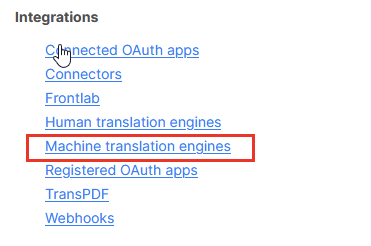
In Phrase, choose Settings → Integrations → Machine translation engines
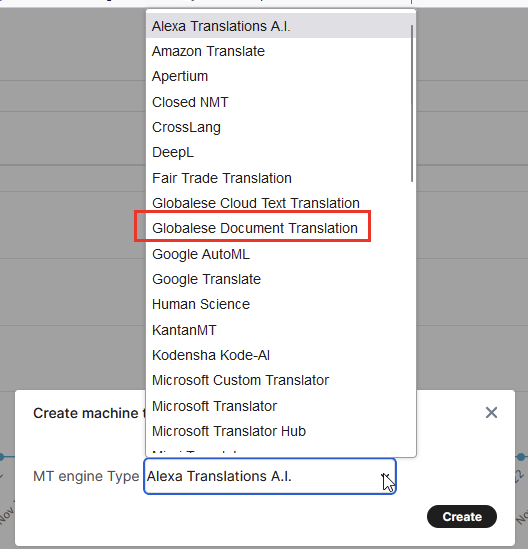
Choose Create → globalese by memoQ Document Translation → Create
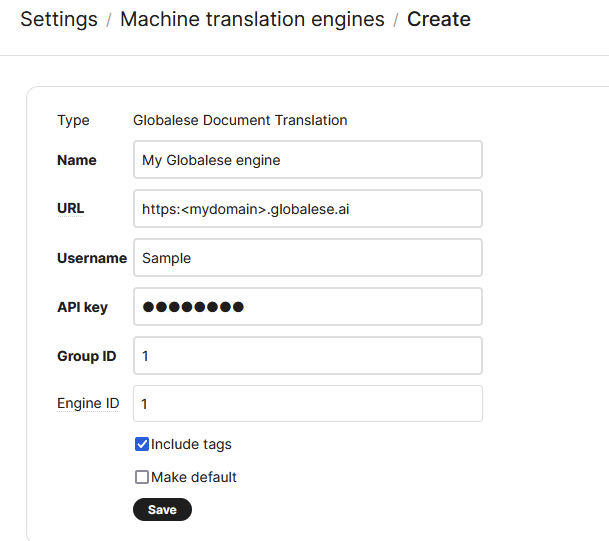
On the Settings page, please fill in the required fields:
-
Name: any name which helps you identifying the engine
-
URL: the base URL of your globalese by memoQ system. The base URL is the link you are use for accessing the system, e.g. https://<mydomain>.globalese.ai
-
Username: the name of the globalese by memoQ user you would like to use for the connection with the engine. Please take care using a user with proper authorization for the engine.
-
API key: the API key of the user you selected. The API key can be retrieved from your globalese by memoQ system from your user profile (Administration → Users)
-
Group ID: the group ID of the engine. The group ID can be retrieved in globalese by memoQ from the engine overview page.
-
Engine ID: the ID of the engine. The engine ID can be retrieved in globalese by memoQ from the engine overview page.
Please note that the Document Translation integration can be used for the document pre-translation scenario only. If you would like to get instant hits from globalese by memoQ in the editor, please use the Cloud text Translation integration option.