

Create or edit a Word filter in memoQweb
Microsoft Word documents are the most common documents that get translated. On this page, you can tell memoQweb how to import Microsoft Office Word 2007 and newer (*.docx) documents.
How to get here
- Log in to memoQweb as an administrator or a project manager.
- On the left sidebar, click Resources.
-
Under Resources, click Filters.
- Click the Create button in the top right corner of the page.
- In the dropdown, click Create new filter.
-
In the Create filter window, fill in the Name and Description fields.
-
In the Filter type dropdown, choose Microsoft Word filter.
-
In the Filter type dropdown, choose Microsoft Word filter.
-
Click Continue at the bottom of the page.
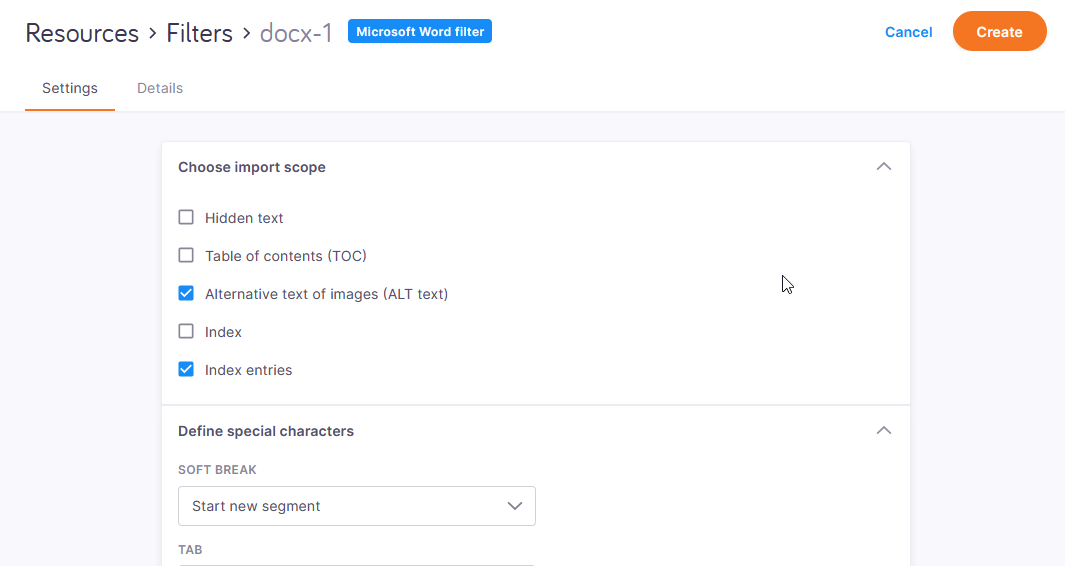
The filter's page opens.
What can you do?
 Change the filter's name and description
-
At the top of the page, click the Details tab.
-
Change the contents of the Name and Description fields as needed.
Choose what to import
- Hidden text: Allows you to import text that is there in the Office document but formatted to be invisible.
- Alternative text of images (ALT text): Allows you to import ALT text. This feature is important for screen reader users as they use ALT texts in their everyday work.
Index: Allows you to import the index. In Word, the index is a field that is generated automatically from the document's content, so it usually doesn't need translation.
Index entries: Allows you to import the fields in the Office document's text that mark the words or expressions that get in the index.
Update automatic fields in the exported document
A Word document may contain fields that store information like the author's name, creation date, or even the table of contents. memoQ can import translatable content from these fields, and export the translations back into them.
By default, the person opening the exported Word document has to update the fields manually to see the changed content.
To change this, select the Update fields and references on export checkbox.
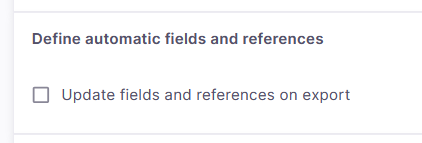
If you do this, Word shows the updated content when you open the exported document.
Manual line breaks, tab characters: New segment or inline tag, or both?
Under Define special characters, choose how memoQ imports manual line breaks (soft breaks) and tabulators. In Word, a paragraph break always means the end of a segment, but a manual line break (Shift+Enter in Word) doesn't end a paragraph.
The tab character jumps to a given position in a line. It can be used to write up text that looks like tables. It is also used to indent the first lines in paragraphs that have a hanging indent.
In memoQ, both characters can mean the end of the segment, and they can also be inserted as inline tags.
memoQ usually starts a new segment at manual line breaks, and shows tabs as inline tags. To change this, an option from the Soft break and Tab dropdowns:
-
Start new segment: memoQ starts a new segment at the manual line break or tab character.
-
Show as inline tag: memoQ shows the manual line break or tab character as an inline tag.
-
Show as inline tag and start new segment: memoQ shows the manual line break or tab character as an inline tag, and starts a new segment as well.
Choose how to import formatting markup
In the Import markup as section, choose Inline tags. The other option imports all formatting markup as legacy memoQ tags, which is not recommended.
Deal with content that only work in Word 2010 and newer
Choose how memoQ should import content from documents that were saved in Microsoft Office 2010 or newer.
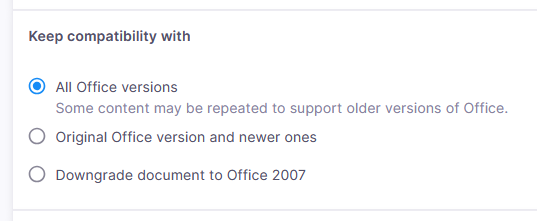
Some parts of a document, like text boxes, are called extensions. In newer versions of Office, each extension is saved twice: one copy for the latest Office, and another copy that older versions (Office 2007 or earlier) can read. This way, your content works no matter which version you open it in.
You have three choices:
| Setting | Imported extensions | Exported file in new Office | Exported file in old Office |
|---|---|---|---|
| All Office versions |
Both, some parts appear in memoQ more than once | Looks new, text is translated | Looks old, text is translated |
| Original Office version and newer ones | New | Looks new, text is translated | Looks old, text is not translated |
| Downgrade document to Office 2007 | Old | Looks old, text is translated | Looks old, text is translated |
Exclude text by style formatting
memoQ can exclude text that is formatted in a specific style. For example, a technical document may include program code that mustn't be translated. The program code is formatted in a different style. You list that style here, so memoQ protects (or doesn't even import) those parts, and translators can't mess them up.
memoQ doesn't read the styles' names from the document, so you need to type them exactly. Before you add one to the list, open the document in Word, and double-check.
There are two types of excluded parts:
- Internal: This is text formatted with a character style. It usually marks an expression inside a segment that is formatted differently. Example: A reference to a part of program code in a sentence. When memoQ excludes text in an internal style, that part is replaced with an inline tag.
- External: This is text formatted with a paragraph style. Example: A complete snippet of program code in the middle of the document. When memoQ excludes text in an external style, that text isn't imported.
To add a style to the list:
-
Under the listed styles, click Add style.
-
On the Add style panel, type the style's name in the Name text box.
-
Under Type, choose Internal or External.
-
Click Add.
To remove a style from the list: Click the X on the right side of its label.
Legacy Trados markup styles are in the list: memoQ excludes parts that are formatted in the tw4winInternal and the tw4winExternal styles if you don't change these settings.
Import tracked changes, export tracked changes - or not
If a Word document contains tracked changes, memoQ can import them directly. This is useful when you translate a document, and then it gets edited, and you need to translate the edited version, too.
You can set this up in the Track changes section.
First, tell memoQ how it should import tracked changes:
-
By default, the Accept changes before import radio button is selected. memoQ imports the final version only - as if all changes were accepted.
-
Choose Reject changes before import to import the unedited version - as if all changes were rejected.
-
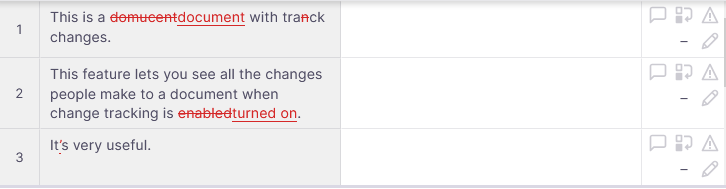
Choose Keep edits as tracked changes to import the tracking markup - to see how the document was edited.
In memoQ editor, tracking markup looks like this:
Then, tell memoQ how it should export tracked changes.
memoQ exports tracked changes from the target text, no matter what tracked changes you imported for the source text.
-
By default, the memoQ desktop app uses the option (accept all changes, reject all changes, or export markup) that you set locally in the Miscellaneous pane of the Options window.
But memoQweb can't access options that are locally saved in the desktop app. On the web, you can see the Accepted changes option instead.
When you import a document with a Word filter that is set to Accepted changes, the exported document's content depends on where you're exporting:
-
From the memoQ desktop app: based on what is selected n the Miscellaneous pane of the Options window, memoQ accepts all changes, rejects all changes, or exports the change tracking markup.
-
From memoQweb: all changes are accepted in the exported document.
-
-
Click Final file version to export the final version with all changes accepted.
-
Click Markup with track changes to export the tracking markup - to see what was changed.
Import or ignore comments
A Word document may contain a lot of comments. You can decide what happens to them.
memoQ doesn't import comments from Word documents unless you say so.
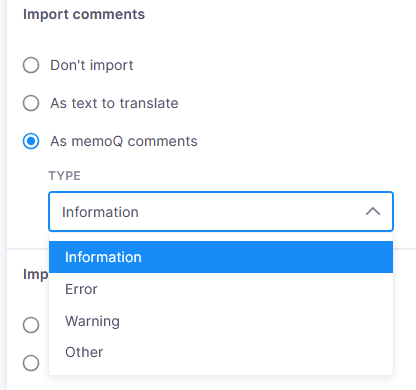
-
To import Word comments as memoQ comments, click As memoQ comments. Then, select a type from the Type dropdown. You can select Information, Warning, Error, or Other. If a comment refers to a part of a segment, memoQ adds it to that specific part of the source text. If it refers to text across multiple sentences, memoQ adds it as a segment-level comment to all affected segments.
-
To import Word comments as translatable text, click As text to translate. Each comment is added as a separate segment for translation.
If you import hidden text, any comments attached to that text are also imported.
Tell memoQ which numbering formats to import
You can choose to import all automatic numbering formats, or only those that are used in the document.
You have three choices:
- All formats from the file: memoQ imports all the numbering formats from the document's styles.
- Used formats only — added at the end of the file: memoQ imports only the numbering formats that appear in the Word document. You can find them in the last segments of the imported document.
- Used formats only — placed where first used: memoQ imports only the numbering formats that appear in the Word document. You can find them at their first occurrence in the imported document. This is the default choice.
Reduce the number of tags
When you import a Word document, there can be too many tags, especially if the Word document was converted from a scanned PDF.
You have two options
-
Ignore script-based font formatting: Don't clear this checkbox. The main font may need to change when you are translating from Arabic or an Asian language into a European language. The source text may still contain some Latin words. Before memoQ introduced the font substitution option, every switch between the Latin and Arabic/Asian characters resulted in tags in the imported source text because MS Word automatically changed fonts there.
In many cases, you do not need these font changes in the target text. If you are translating from Japanese (with some English words like company names etc. interspersed) into English, the translated text won't contain any Japanese characters. But in Word, a formatting instruction can have information like "use this font if the part of text is Asian, but use that font if it is Latin." There is also a "hint" attribute for each part of text that tells Word about the type of script a part of text has (Asian, Arabic, etc). memoQ ignores the "hint" attribute if you select this checkbox. The attribute won't make sense in the translated text. It's very likely that the script will change because you translate from Japanese to English.
- Ignore minor formatting differences: Select this checkbox when you work with a scanned document or a document converted from a PDF file. It reduces the number of tags in your document. memoQ ignores formatting changes such as baseline shifts, character spacing changes, and character compression.
When you finish
In the upper right corner, click Save.
If there is an invalid setting in the filter, a red dot appears on its tab (Settings or Details):
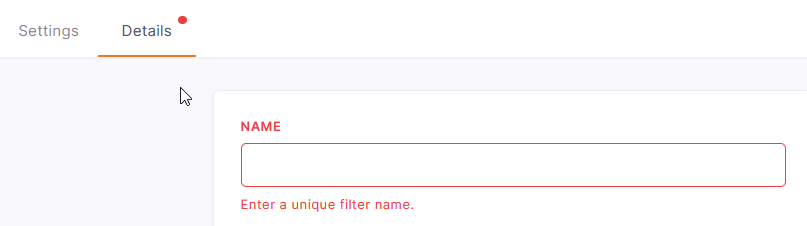
Correct the mistake and click Save again.