DITA files in memoQ
What’s DITA?
DITA (Darwin Information Typing Architecture) is an XML-based standard used for creating and managing structured content. It's commonly used for technical documentation, user guides, knowledge bases, and other modular documentation.
DITA content is built from small reusable topics that can be combined into larger documents using DITA maps. This modular structure makes documentation easier to maintain, reuse, and translate.
How memoQ supports DITA
How memoQ supports DITA?
DITA support in memoQ is built from two separate components:
-
DITA filter (built-in filter)
The software component that imports and processes DITA files.
-
A customizable configuration that defines how memoQ processes the XML structure inside DITA files.
Although they are related, they serve different purposes.
 Supported DITA file extensions
memoQ recognizes several common DITA-related file types.
When you import a file with one of these extensions, memoQ automatically uses the DITA filter.
Common DITA file extensions include:
In most cases, you don’t need to manually select the filter. memoQ automatically chooses the correct one during import.
The DITA filter (built-in filter)
The DITA filter is a built-in component of memoQ.
It's implemented as a DLL software module, which means it is part of the memoQ application itself.
The DITA filter is included in both:
-
memoQ desktop app
-
memoQ TMS
Because this filter is built into the software, memoQ replaces it with the default (factory) version whenever the program is installed, updated, or upgraded.
Importing DITA files
When you import a file with a DITA extension, memoQ automatically selects the DITA filter.
The filter:
-
Imports DITA files directly.
-
Recognizes their structure automatically.
-
Prepares the content for translation.
Unlike many other filters, the DITA filter has no configurable options. This means you can’t adjust settings directly when importing a DITA file.
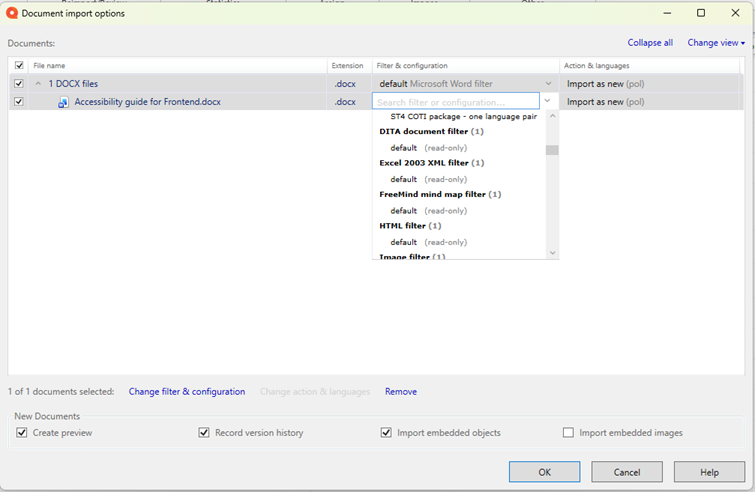
However, you can still modify how memoQ processes content by using cascading filters.
Cascading filters allow memoQ to process a file through multiple filters in sequence. This can be useful if you need additional processing steps for specific types of content.
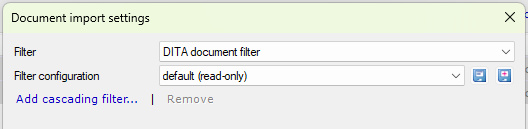
When creating a cascading filter:
-
You will see the DITA filter listed among available filters.
-
The DITA filter configuration won’t appear there.
This is because cascading filters work with the filter itself, not with its configuration.
How to handle unexpected tags in DITA files?
Sometimes you may see more tags than expected when importing a DITA file.
This usually happens because:
-
DITA files are highly structured XML documents.
-
memoQ preserves many structural elements as tags.
This behavior is normal and ensures that the structure of the document is preserved during translation.
If the number of tags makes translation difficult, you may want to:
-
Adjust XML handling rules.
-
Customize which elements appear as translatable content.
These changes are usually made by localization engineers or advanced users.
The DITA filter configuration
The DITA filter configuration defines how memoQ handles the XML structure inside DITA files.
It contains rules that tell memoQ’s XML processing engine:
-
Which elements are translatable.
-
How tags should be handled.
-
How content should be segmented.
This configuration is installed only with the memoQ desktop app. It’s not included in the memoQ TMS installer.
If the DITA filter configuration appears on a memoQ TMS, it means that a user published it from their memoQ desktop app.
Convenience resource
The DITA filter configuration is a special type of resource called a convenience resource. A default version of this configuration is installed automatically during every new memoQ desktop app installation.
Because users can customize the configuration, memoQ protects these changes during updates.
If the configuration was modified:
-
memoQ won’t overwrite it during updates or upgrades.
-
This ensures that custom user settings are preserved.
Restoring the factory configuration
When should I use the DITA filter vs. the XML filter?
In most cases, you don’t need to choose between them manually.
When memoQ detects a DITA file extension, it automatically uses the DITA filter.
The DITA filter configuration, on the other hand, works in the background. It defines how memoQ processes the XML structure inside the file.
For most users:
-
The DITA filter is the only visible part during file import.
-
The configuration works behind the scenes.
You usually only interact with the configuration if you need custom XML handling rules.
Working with DITA projects
DITA files are often part of larger documentation sets.
Topics are typically organized using DITA maps, which reference multiple files.
When translating DITA content, it is usually best to:
-
Import DITA maps together with their topic files.
-
Keep the original file structure.
This helps maintain consistency across the entire documentation set