

Create a new ICR configuration
How to get here
- Log in to memoQweb as an administrator or a project manager.
- On the left sidebar, click Resources.
-
Under Resources, click ICR configurations.
-
At the top right, click the Create new button.
The Create new page opens.
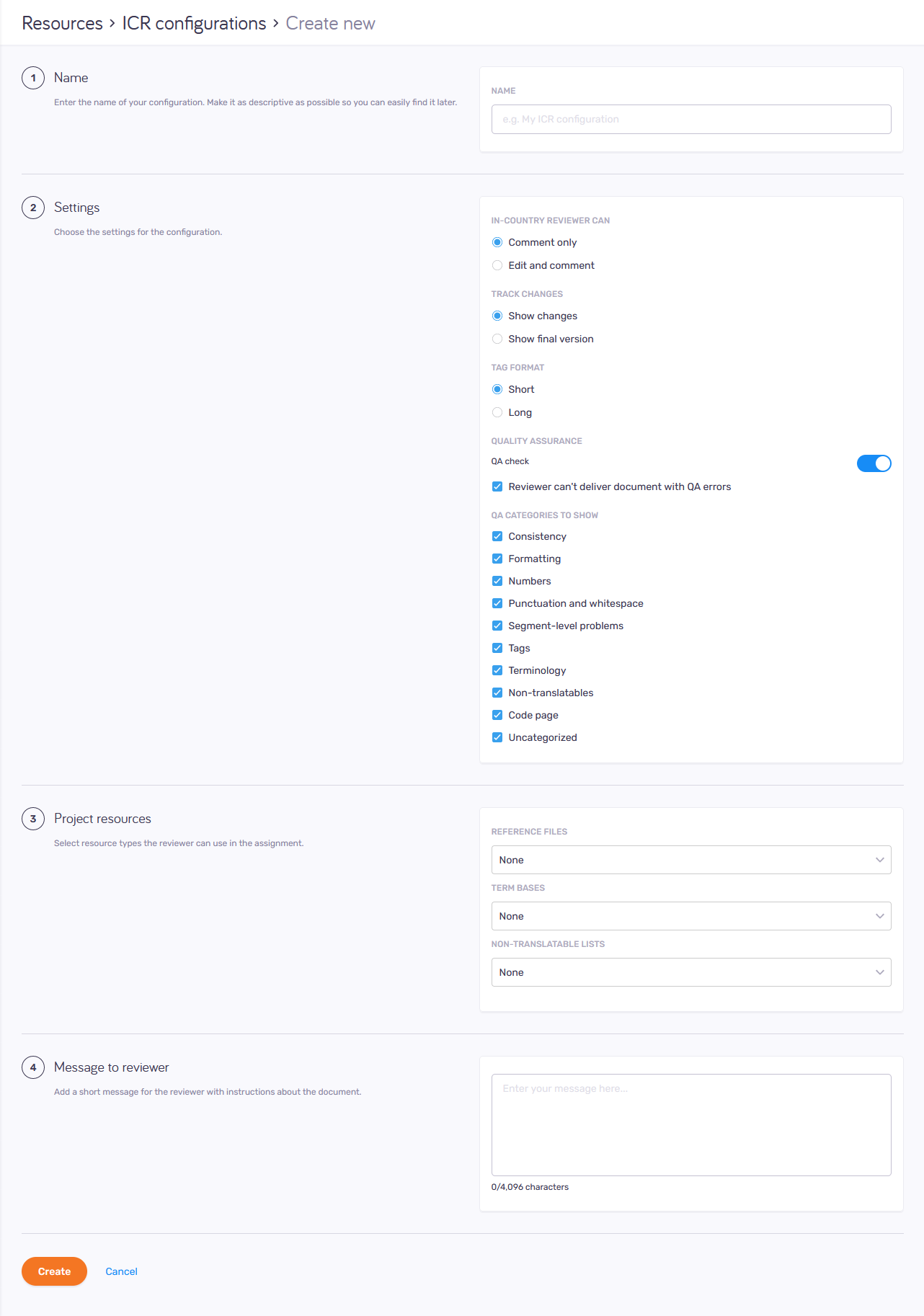
What can you do?
-
Name your configuration
Make it as descriptive as possible so you can easily find it later.
-
 Choose configuration settings
-
Under In-country reviewer can: Choose if the reviewer can edit and comment on the translation or only add comments.
-
Under Track changes: Decide if you want the reviewer to see all the changes made in the document, or the final version. They can change this setting later in the tool.
-
Choose a Tag format for the project - short or long. The reviewer can change this setting later in the tool.
-
Under Quality assurance: Decide if you want to allow QA check. The QA check option is switched on by default.
-
If you don’t want the reviewer to leave QA errors in the final document: Check the Reviewer can’t deliver document with QA errors checkbox.
-
Under QA categories to show: Select which categories you want your reviewer to see during the review process.
QA categories in the Settings section
Consistency: 3030, 3100, 3101, 3151, 3152, 3153
Formatting: 3067, 3131, 3132, 3133, 3134
Numbers: 3061, 3062, 3063, 3064, 3065, 3066, 3068, 3069
Punctuation and whitespace: 3020, 3050, 3071, 3072, 3073, 3074, 3075, 3076, 3077, 3078, 3079, 3080, 3086, 3087, 3088, 3089, 3110, 3190, 3191, 3192, 3193, 3194, 3195, 3196, 3197
Segment-level problems: 3010, 3040, 3081, 3082, 3083, 3084, 3180, 3181, 3182, 3200, 3201, 3202, 3203, 3204, 3205, 3206, 5003, 5005
Tags: 1001, 1002, 2001, 2003, 2004, 2007, 2008, 2009, 2010, 2011, 2012, 2013, 2014, 2015, 2016, 2017, 5001, 5002
Terminology: 3091, 3092, 3093, 3097, 3098, 3140
Spelling: 3161, 3162
Non-translatables: 3094, 3095, 3096
Code page: 2005, 2006, 3120
Uncategorized: 3220, 3221
See all the QA issues with codes and descriptions in the Quality Assurance (QA) warnings topic.
-
-
Select project resources
If you added resources to the project, you can use the dropdowns in the Project resources section to choose which ones the reviewer will get to use.
Make sure to add those materials to the project, to make them available to the reviewer.
-
Add reference resources to a project
-
In the memoQ desktop app, open your online project.
-
Add resources to the project as needed:
-
In the Term bases window, select the checkbox for each term base you need.
-
In the Non-translatable lists window, select the checkbox for each non-translatable list you need.
-
In the LiveDocs window, select the checkbox for at least one corpus - or create a new one.
In-country reviewers can only use reference files that are in LiveDocs corpora added to the project.
To import them into the LiveDocs corpus, go to the LiveDocs ribbon and use the Import Reference File option. They will appear as binary reference files – even if they are text-based.
-
If you only need to add term bases and LiveDocs corpora (but not import anything into them), you can also use memoQweb's Resources module.
Project resources types:
-
Reference files: These are the files in the LiveDocs corpora added to the project.
-
None: The reviewer won't see any reference files.
-
All: The reviewer will see all the reference files in the project's LiveDocs corpora.
-
Match the document's source language, Match the document’s target language, Match the document’s source or target language: When you import a reference file into a LiveDocs corpus, you need to tell memoQ what language it is in. The reviewer will see the files imported with the source language, target language, or both.
-
-
Term bases:
-
None: The reviewer won't get terms from any of the project's term bases.
-
All: The reviewer will get terms from all the project's term bases.
-
Rank 1 only: In a project, each term base has a rank. Terms from the TB with rank 1 appear first. The reviewer will get terms from only this term base.
-
Primary resource only, Reference resources only: In a project, translators can add terms to one TB during translation. This is the primary TB (and the rest are reference TBs). The reviewer will get terms from only this term base, or all the others.
-
Term bases selected for QA: In a project, terminology QA uses only those TBs where the QA checkbox is selected (or, Use in QA in case of memoQweb). The reviewer will get terms from only these term bases.
-
-
Non-translatable lists:
-
None: The reviewer won't get terms from any of the project's non-translatable lists.
-
All: The reviewer will get terms from all the project's non-translatable lists.
-
Primary only: In a project, translators can add non-translatable terms to one non-translatable list during translation. This is the primary non-translatable list. The reviewer will get terms from only this non-translatable list.
-
-
-
Add message to reviewer
In the Message to reviewer section, you can write whatever you think can be important for your reviewer - instructions or additional information.
When you finish
To create the ICR configuration with the above settings and return to the ICR configurations page: Click the Create button.