

Administration - Reports
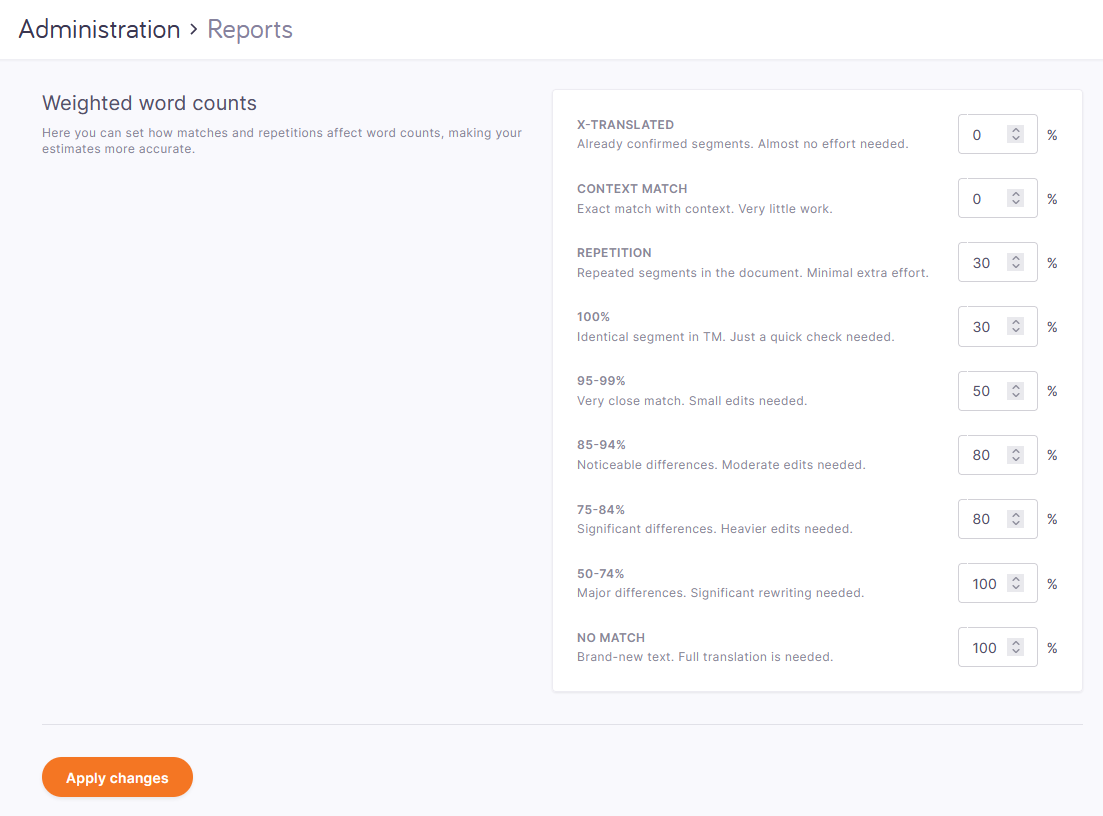
On this page, you can set the weight for each match category, so that memoQweb can compute weighted word counts when it creates an analysis report in a project. But what are they?
Compared to translating the text from scratch, you need to work less on a segment if there's a translation memory match - in theory. Before you start working, you need to have an idea how much that work will be. Especially when the job is about upgrading the translation of some documents to newer versions. In this case, the actual translation work can be as little as 10% (or less) of the total word count of the source documents - because for much of the text, you can use the translation from before.
memoQ gives you the word counts grouped by match categories: you'll know how many words are in segments that have 100% matches; how many have 95-99% matches etc.
For each match category, you can have a weight. The weight is between 0% (no work at all) and 100% (translating every word from scratch). You multiply the word count in a category by the weight. Then you'll have a theoretical, weighted, word count.
Example: If a segment has a 90% match, that usually means a difference of one word. Your weight for that match category (85-94%) could be 50%. If the segment is 10 words, you count 5 words for that segment.
Counting this makes sense only if an online project has at least one translation memory or LiveDocs corpus.
How to get here
- Log in to memoQweb as an administrator.
- On the left sidebar, click the Admin
 icon.
icon. -
On the Admin screen, click the Reports button. The Reports screen opens.
What can you do?
Set the weight for each match category: Change the percent in the box where necessary.
Click the Apply button to save your changes.