

memoQ AGT accounts and API keys
To use memoQ AGT, you usually need a subscription. To see basic info about your subscription (or buy one):
-
Log in to my memoQ with your email and password.
-
On the left, click memoQ AGT.
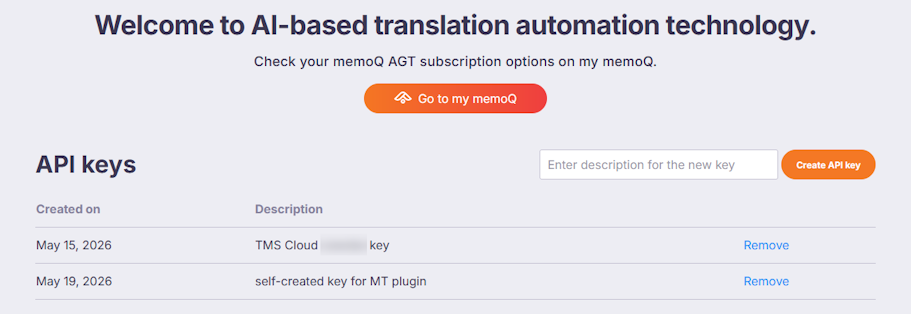
To see more details, click the Open memoQ AGT dashboard button. The memoQ AGT admin page opens. At the bottom of this page, there is a list of API keys:
An API key is like a password. The AGT dashboard shows it when you create it, but never again.
As a best practice, create an API key only when you need one, and copy-paste it into the API key field in memoQ before you close its window on the AGT dashboard.
When you begin a memoQ TMS trial, a memoQ AGT trial also starts automatically, and you get a default API key, called TMS Cloud <your-cloud-instance-name> key. This is the first one in the image above.
With this API key, you can translate documents with AGT without creating MT settings. It works automatically, but you can't see or copy it.
But to set up AGT in MT settings, you need to enter an API key. To do that:
-
Enter a short description into the text box above the API keys list.
-
Click the Create API key button.
The New API key created page opens, displaying the generated API key along with a reminder to copy and save it.
-
Click the Back to admin page link.
On the admin page, a new line appears in the API keys list (like the second one in the image above).
In rare cases, you might receive an API key from somebody else - that is, generated in another AGT account. If you set up AGT in MT settings with such a key, the usage costs go to the owner of that account.