

ICR tool for project managers
Reviewers can check and approve translations directly on the web interface, without needing to install or use a translation tool.
Licenses:
ICR licensing depends on your memoQ TMS edition:
-
memoQ TMS Essential - ICR is available as a paid add-on.
-
memoQ TMS Professional and memoQ TMS Premium - ICR is included at no extra cost.
Each reviewer assigned to an ICR review task needs a web license. If you don't have a web license available, the reviewer can use a translator pro license instead.
How to get here
- Log in to memoQweb as an administrator or a project manager.
- On the Active projects list, click a project.
- At the top of the screen, click the Translations tab.
-
In a document's row, choose an in-country reviewer for the Reviewer 1 or the Reviewer 2 role. You can assign the same user for both roles.
You can assign users manually or use advanced assignment types such as FirstAccept, GroupSourcing, distribute documents, or auto-assign. You can also divide your document and assign the created parts (called slices) to different reviewers.
-
The Select ICR configuration window opens.
Select one of the ICR configurations from the dropdown (some are already available on the server) or create a new one in the ICR configurations page.
-
At the end of the document's row, click the More options
 button.
 -
In the menu's In-country review section, click Open in read-only mode
The In-country review tool opens, showing the assigned document .
.
What can you do?
In the desktop app
 Add ICR users or groups to a project
-
For future projects:
-
In the desktop app, click the Resource console
 icon.
icon. -
Select a project template and click Edit.
-
In the Edit project template window, on the left, click People.
-
On the Project users tab, click the Add user button.
The Add users to project window appears.
-
Under Add users in role, click the Reviewer 1 or Reviewer 2 radio button as needed. The list below will show the users you can add in that role.
If you add an ICR user, and their language pairs match the source and any of the target languages in the project template, they will automatically appear on the Languages and roles tab in the correct row and under the correct role.
You can't combine in-country reviewers and other users with matching language pairs in the same role.
-
Select the ICR users you need, and click OK to confirm.
-
To return to the People pane without changes: Click Cancel.
-
-
For existing projects:
-
On the Dashboard, double-click a project.
-
In the memoQ online project window, on the left, click People
 .
. -
On the Project users tab, click the Add user button.
The Add users to project window appears.
-
Under Add users in role, click the Reviewer 1 or Reviewer 2 radio button as needed. The list below will show the users you can add in that role.
If you add an ICR user, and their language pairs match the source and any of the target languages in the project template, they will automatically appear on the Languages and roles tab in the correct row and under the correct role.
You can't combine in-country reviewers and other users with matching language pairs in the same role.
-
Select the ICR users you need, and click OK to confirm.
-
To return to the People pane without changes: Click Cancel.
-
Check ICR configurations in the Settings pane
-
Open an online project, and then open the Settings
 pane.
pane. -
Under the General tab, open the Project options section.
- At the bottom of this section you can find:
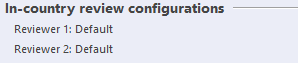
Check here what ICR configurations will be used in the ICR project by default.
You should see here:
Reviewer 1: name of the ICR configuration set in project template for reviewer 1.
Reviewer 2: name of the ICR configuration set in project template for reviewer 2.
Use Automated actions
Here you can:
-
Activate auto-assignment for ICR users - if you manually activated auto-assignment for your ICR project, you can easily have your ICR users available for auto-assign.
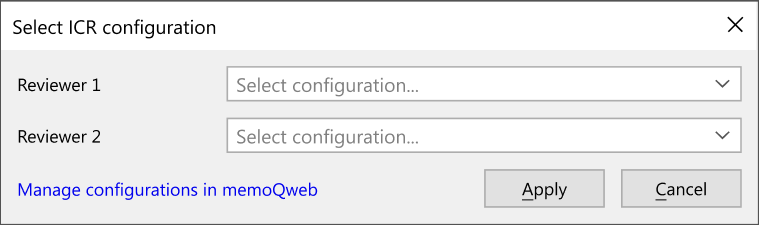
In the Select ICR configuration pop-up window select an ICR configuration and click Apply.
-
Auto-assign ICR users to documents - if you used the Auto-assign users to documents automated action in your project template, you can use the ICR configurations selected in the project template for the ICR users.
It can happen that:
-
The auto-assign feature tries to assign ICR and non-ICR users to the same role on the same documents. In such a case, memoQ TMS displays an error in the server log.
-
The auto-assign feature can’t find the ICR configurations in the project template. In such a case, memoQ TMS displays an information message in the server log and uses the default ICR configuration.
-
You're a cloud server user and don't have access to the server log. In such a case, contact our support team for guidance.
Add ICR configurations to an online project template
You can add ICR configurations to an online project template from the desktop app. To do that, you can use a newly created project template, a cloned one, or edit an already existing template. To do so:
-
In the desktop app, click the Resource console
icon. -
In the Resources list, click Project templates
 .
. -
In the list, select an online project template (one that has a server address in the Path/URL field) and click Edit.
-
Then, on the left, click the Online project settings section.
-
At the bottom of the Workflow settings
 tab you can see two dropdowns, for Reviewer 1 and Reviewer 2.
 -
Choose an ICR configuration from the available options. For a new template, memoQ displays the default configuration in both dropdowns.
If you can’t find a configuration for a role, choose Default. It is possible that the template was imported from another memoQ TMS and contains an ICR configuration that existed only in that memoQ TMS.
-
To create new or edit existing configurations in memoQweb: Click Manage configurations in memoQweb. You will be automatically logged in to the ICR configurations page.
-
To confirm: Click OK.
-
To return to the Resource console window without changes: Click Cancel.
If you change an ICR configuration while the ICR user is working, they need to reload the page to get the updated settings. This applies when you select a different configuration or edit the current one.
In memoQweb
Manage created project
Find the project you created on the Active projects list.
Here you can:
-
Change selected reviewer – hover over the field under reviewer 1 or reviewer 2. Click the Edit assignment
 icon. memoQweb displays a list of available reviewers in a dropdown menu. Choose a new reviewer and click the Assign button. If you don’t want to change the reviewer, click Cancel.
 -
Change selected configuration - select one or more projects from the list and click Change ICR configuration above the list. From the dropdown, select Reviewer 1 or Reviewer 2. memoQweb displays the Select ICR configuration window. Select a new configuration from the dropdown or click Manage configurations to manage your configurations in memoQweb.
-
At the end of the document's row, click the More options
button and select:-
Open in read-only mode
- to check if the instructions, settings and resources are working as expected.If not, go back to the project in memoQ or memoQweb, clear the assigned ICR user, then assign them again to the same review role. This way you can choose the correct settings in the configuration.
-
Copy URL to Clipboard
 - to send a direct link to the project to the reviewer.
 -
Change config for R1
 - to change the selected ICR configuration for the reviewer 1 in the Select ICR configuration window. This option is displayed only if you have R1 already configured.
 -
Change config for R2
- to change the selected ICR configuration for the reviewer 2 in the Select ICR configuration window. This option is displayed only if you have R2 already configured.
-
Check project template configurations in memoQweb
If you want to check your ICR project template configurations in memoQweb:
-
On the Projects page, find your project and click its name.
-
Then, from the top menu, select Settings.
-
On the next page, click Template
. -
In the Template settings section, click the template's name.
In the settings list, click Workflow settings.
-
At the bottom of this section, look at In-country review configurations.
Managing ICR access in views
When a reviewer works in a view, what they can see and do depends on the documents and rows included in the view and the ICR settings you create for their assignment.
Each row uses the ICR settings of the document it belongs to. If you create different settings for R1 and R2, ICR uses the settings for the role that applies at that stage of the workflow.
ICR users can edit rows only when:
-
the document is available for editing,
-
the ICR settings allow editing,
-
the row itself isn't locked or read-only.
For example, if a document isn't yet available to the user or has already been completed, its rows are shown as read-only.
The following settings apply by default when working in a view:
-
Comment only / Edit and comment - they follow the configuration you chose for the relevant assignment.
-
Track changes - they always use Show my changes.
-
Tag format - ICR always uses Short.
-
Quality assurance - ICR follows the configuration you chose for the relevant assignment.
-
Project resources - ICR follows the configuration you chose for the relevant assignment.
-
Reference files - This is the broadest setting when different configurations apply.
For example, if one configuration allows files matching the source language and another allows files matching the target language, files matching either the source or target language are available.
-
Message to reviewer - Not available in views.
You can manage ICR configuration at any point.
When you finish
Once you finished the configuration and added the reference files, you can choose how to give reviewers access to their tasks:
-
Send an email with a link: Send reviewers an email with a subject such as New project assigned to you or New documents assigned to you. Make sure you included a link to the document in the In-country review links for assigned documents section.
-
Send a direct link: Send reviewers the URL of their review task that they can open directly in the browser.
-
Share the memoQweb address: Give reviewers the URL of the memoQweb site where they need to work.